"Title Case or Sentence case for this heading?" "Is it userName or user_name?" "Why does my URL have capitals in it?" Text case looks like a small detail, but it affects how readable your writing is, whether code follows its language's conventions, and whether two URLs count as the same page.
This guide explains every common case style, where each one is the norm, and how to convert text quickly without introducing new mistakes.
Quick answer: Use Sentence case for most headings and UI text, Title Case where your style guide asks for it, lowercase with hyphens (kebab-case) for URLs, and your programming language's convention for code: camelCase in JavaScript and Java, snake_case in Python. CurePDF's Case Converter switches between them instantly in your browser.
The Case Styles at a Glance
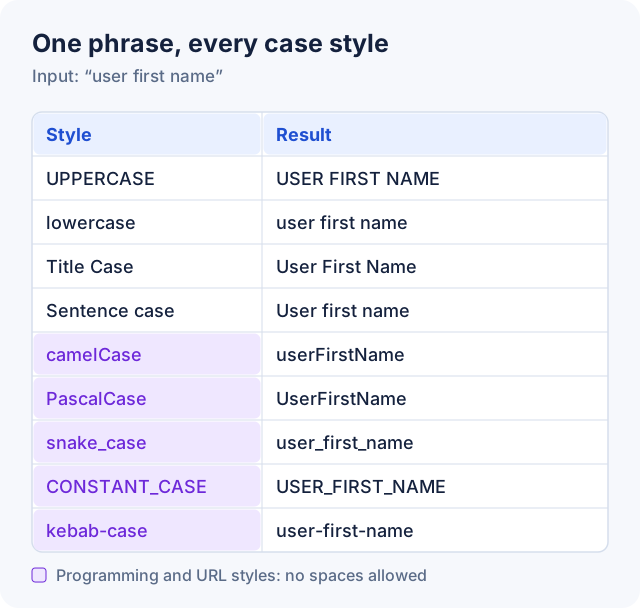
| Style | Example | Typically used for |
|---|---|---|
| UPPERCASE | USER FIRST NAME | Acronyms, short labels, emphasis |
| lowercase | user first name | Tags, usernames, cleaning up text |
| Title Case | User First Name | Book, film, and article titles; some headings |
| Sentence case | User first name | Normal text, most headings, buttons, and menus |
| camelCase | userFirstName | Variables and functions in JavaScript and Java |
| PascalCase | UserFirstName | Class names in most languages; React components |
| snake_case | user_first_name | Python variables and functions; database columns |
| CONSTANT_CASE | USER_FIRST_NAME | Constants in Python, Java, and JavaScript |
| kebab-case | user-first-name | URLs, file names, CSS class names |
Case Styles for Writing
UPPERCASE
Every letter is a capital. It suits acronyms (PDF, GST, NASA), short labels, and occasional emphasis. Long passages in capitals are harder to read, and in emails and messages they come across as shouting.
lowercase
Every letter is small. It's useful for cleaning up text that was typed with Caps Lock on, and for values that should never have capitals, such as tags. Remember that it also lowercases names and acronyms.
Title Case vs Sentence case
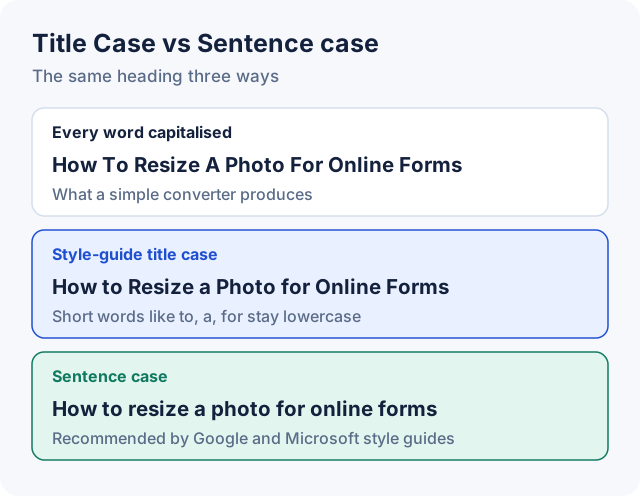
Title Case capitalises the main words of a title. Most style guides, such as AP and Chicago, keep articles (a, an, the), conjunctions (and, but, or), and short prepositions (of, in, to) lowercase unless they're the first or last word. The guides differ on details, such as which prepositions count as short.
Sentence case capitalises only the first word and proper nouns, like a normal sentence. Google's and Microsoft's writing style guides both recommend it for headings, because it's easier to scan and there's no rule list to argue about.
Whichever you choose, use it consistently across the whole site or document.
Common mistake: Trusting an automatic converter with names and acronyms. Converters apply a simple rule to every word, so they can't know that "iPhone" or "ISRO" should keep their capitals. Always read the result.
Here's exactly what CurePDF's Case Converter does, so you know what to check:
- Title Case capitalises the first letter of every word and lowercases the rest, so "how to resize a photo" becomes "How To Resize A Photo". Lowercase the short words yourself if your style guide asks for that. Acronyms and brand names change too: "NASA launches new iPhone app" becomes "Nasa Launches New Iphone App".
- Sentence case lowercases everything, then capitalises the first letter of each sentence. "i met Priya in Delhi. she works at ISRO." becomes "I met priya in delhi. She works at isro." Put the capitals back on names afterwards.
Case Styles for Code
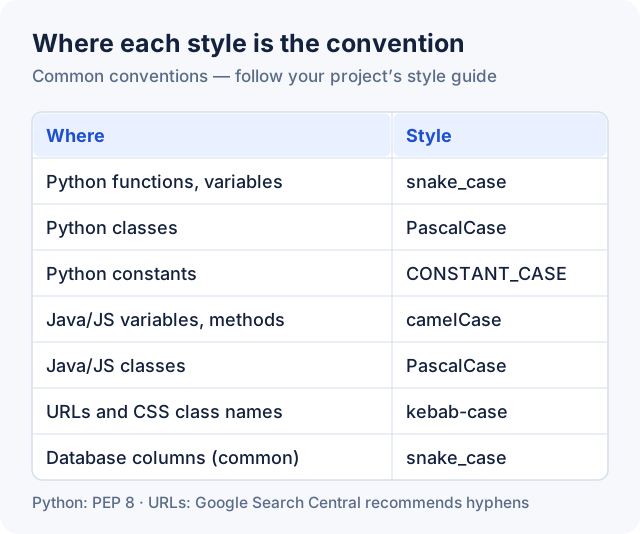
Programming languages don't allow spaces in names, so developers join words using capitals or separators. Each language has its own convention, and following it makes code easier for others to read.
- camelCase (
userFirstName): the first word is lowercase and each later word starts with a capital. It's the usual style for variables and functions in JavaScript and Java, and common for JSON keys in JavaScript APIs. - PascalCase (
UserFirstName): like camelCase, but the first word is capitalised too. It's used for class names in most languages; Python's PEP 8 calls it CapWords. - snake_case (
user_first_name): all lowercase, with underscores between words. PEP 8 uses it for Python function and variable names, and it's common for database column names. - CONSTANT_CASE (
USER_FIRST_NAME): all capitals with underscores. It's the usual style for constants in Python, Java, and JavaScript. - kebab-case (
user-first-name): all lowercase, with hyphens between words. It's used in URLs, file names, and CSS class names. Most programming languages can't use it for variable names, because they read the hyphen as a minus sign.
Case in URLs
Google treats /APPLE and /apple as different URLs, and recommends separating words with hyphens rather than underscores. The simplest rule that avoids problems is lowercase kebab-case for every URL slug.
CurePDF's Slug Generator turns a title into that format as you type. It lowercases the text, replaces spaces and punctuation with hyphens, and converts accented letters to plain ones ("Crème Brûlée" becomes creme-brulee). It works on Latin-alphabet text and removes other scripts. If you want a URL in Hindi or another script, write that slug by hand. Google supports non-ASCII characters in URLs; they're percent-encoded behind the scenes.
How to Convert Text Case
- Open CurePDF's Case Converter.
- Type or paste your text.
- Click a style: UPPERCASE, lowercase, Title Case, Sentence case, camelCase, PascalCase, snake_case, aLtErNaTiNg CaSe, or InVeRsE CaSe. The result appears instantly.
- Click Copy result, or Download .txt to save it.
The converter runs in your browser, so your text isn't sent to CurePDF. A few tips for the programming styles:
- Convert existing names between styles. The converter splits words at spaces, punctuation, and changes of capitalisation, so you can paste an existing identifier:
getUserIDbecomesget_user_idin snake_case, andXMLHttpRequestbecomesxmlHttpRequestin camelCase. - Accents are simplified. Identifiers are safest in plain letters, so "Café menu price" becomes
cafeMenuPrice, and "Crème Brûlée" becomescreme_bruleein snake_case. - Other scripts are kept. Text in scripts without capital letters, such as Hindi, stays as it is. camelCase and PascalCase can't show where those words start, though, so snake_case is clearer for them.
- Need CONSTANT_CASE? Convert to snake_case, then click UPPERCASE:
user_first_namebecomesUSER_FIRST_NAME. - Need kebab-case? Use the Slug Generator, which produces lowercase words joined by hyphens.
Tip: Capitalising each word of a hashtag (PascalCase, like #WorldBookDay) makes it easier to read, and screen readers are more likely to pronounce the words correctly.
Frequently Asked Questions
What's the difference between Title Case and Sentence case?
Title Case capitalises the main words of a title, such as "How to Resize a Photo". Sentence case capitalises only the first word and proper nouns, such as "How to resize a photo". Google's and Microsoft's style guides recommend sentence case for headings.
What's the difference between camelCase and PascalCase?
Both join words with capitals and no spaces. camelCase starts with a lowercase letter (userFirstName); PascalCase starts with a capital (UserFirstName). camelCase is common for variables and functions, PascalCase for class names.
When should I use snake_case?
For function and variable names in Python (PEP 8 recommends it), and commonly for database column names. Use CONSTANT_CASE, the all-capitals version, for constants.
Should URLs use hyphens or underscores?
Hyphens. Google recommends hyphens to separate words in URLs, and lowercase avoids the same page appearing under two addresses. A slug like how-to-resize-a-photo is the standard format.
How do I change uppercase text to lowercase?
Paste the text into the Case Converter and click lowercase, or Sentence case if you want the first letter of each sentence capitalised. Check names and acronyms afterwards, since the converter lowercases those too.
Why did the converter change my acronyms?
Title Case and Sentence case apply one rule to every word, so "NASA" becomes "Nasa" or "nasa". Fix acronyms and brand names by hand after converting.
Is my text uploaded anywhere?
No. The Case Converter and Slug Generator both run entirely in your browser, and your text isn't sent to CurePDF's servers.
Have text to fix? Open the Case Converter, or the Slug Generator for URLs.