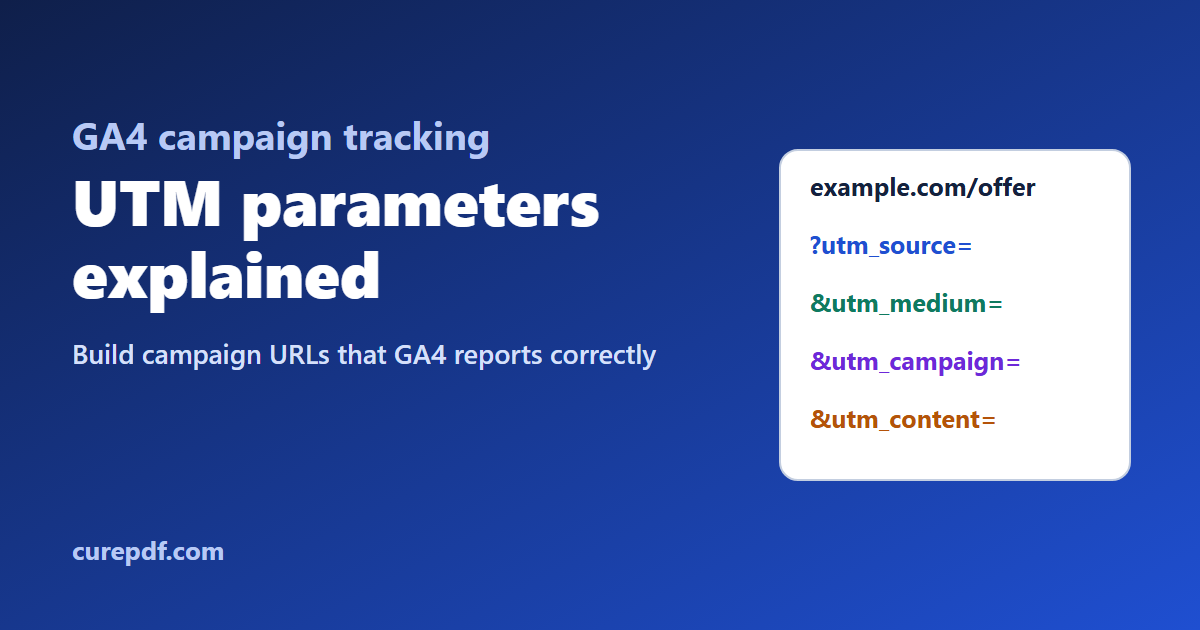
You send a newsletter, post on Instagram, and print a QR code on a flyer, and they all link to the same page. A week later, Google Analytics shows a jump in visits but can't tell you which one worked. UTM parameters fix that: small tags added to the end of a link that tell GA4 exactly where each visit came from.
This guide explains what each UTM parameter means, how GA4 uses them, the naming mistakes that quietly split or misfile your data, and how to build and check campaign URLs.
Quick answer: Add
utm_source,utm_medium, andutm_campaignto every link you share outside your website, using consistent lowercase values, for example?utm_source=newsletter&utm_medium=email&utm_campaign=diwali_sale_2026. CurePDF's free UTM Builder assembles the link for you in your browser.
What Are UTM Parameters?
UTM parameters are query-string tags whose names start with utm_. They ride along on a link. When someone clicks it, GA4 reads the tags from the page address and records them with the visit. They don't change the page the visitor sees.
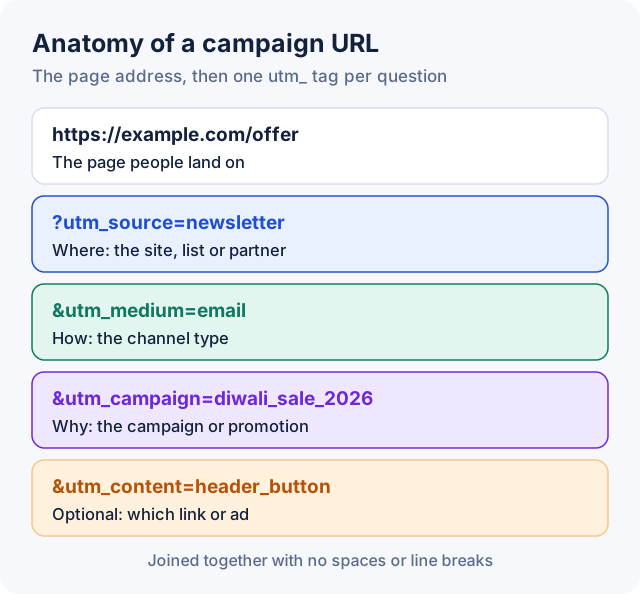
utm_ tag per question you want answered.Without them, most of these visits land in GA4 as "direct" or a generic referral. Email apps, messaging apps, and printed QR codes often pass no referrer at all, so GA4 has nothing else to go on.
The UTM Parameters GA4 Supports
| Parameter | What it answers | Example |
|---|---|---|
utm_source | Where did the visit come from: which site, list, or partner? | newsletter, google, instagram |
utm_medium | What kind of channel was it? | email, cpc, social |
utm_campaign | Which campaign or promotion? | diwali_sale_2026 |
utm_term | Which paid keyword? (optional) | pdf_compressor |
utm_content | Which specific link, creative, or ad? (optional) | header_button |
utm_id | The campaign's ID (optional) | spring_2026_01 |
utm_source_platform | Which platform directed the traffic? (optional) | The ad or marketing platform's name |
Google's documentation says to always use utm_source, utm_medium, and utm_campaign. It also lists utm_creative_format and utm_marketing_tactic, but notes they aren't currently reported in GA4, so most people can ignore them.
One rule catches people out. According to Google's documentation, if any UTM parameter is present on a URL, GA4 takes all its traffic-source values from the UTM parameters. Missing ones show as "(not set)" rather than being filled in from elsewhere. So a link with only utm_campaign loses its source and medium entirely. Always set the three required tags together.
Values Are Case-Sensitive
GA4 treats utm_source=google and utm_source=Google as different values. If different people on your team type Email, email, and e-mail, your reports show three rows for one channel, and you have to add them up by hand.
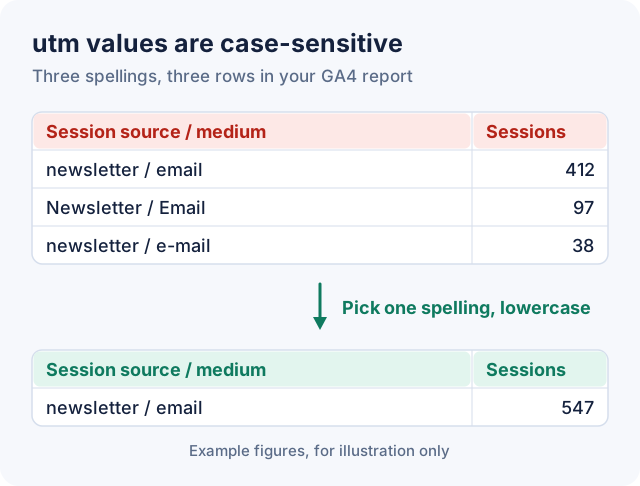
The simple fix is a house style everyone follows:
- Lowercase everything.
email, notEmail. - Use underscores or hyphens instead of spaces. Pick one and stick to it:
diwali_sale_2026. A space in a URL is encoded as+or%20, which is easy to mistype and harder to read. - Keep a shared list of approved sources and mediums, so nobody invents
mailwhen you already useemail. - Put dates or versions in the campaign name (
newsletter_2026_09) so similar campaigns don't merge.
How utm_medium Decides the GA4 Channel
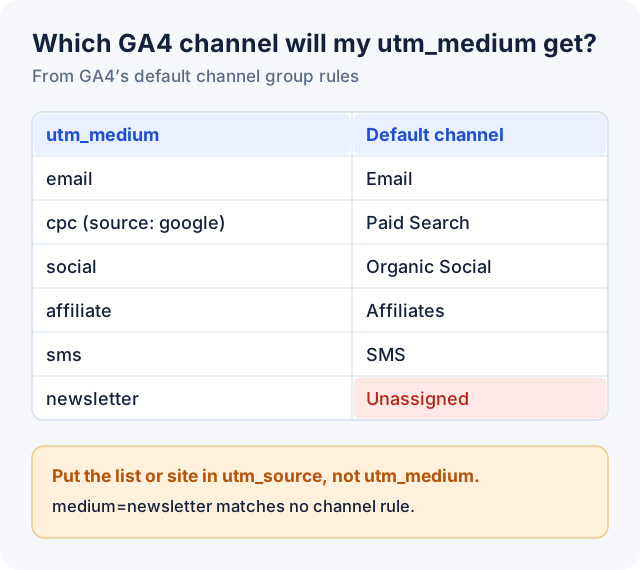
GA4 sorts every session into a default channel, such as Email, Paid Search, or Organic Social, using fixed rules that mostly look at source and medium. These channel rules aren't case-sensitive, but they only recognise certain values. Pick a medium GA4 doesn't know and the visit lands in Unassigned.
| If you're tagging… | Use utm_medium | GA4 default channel |
|---|---|---|
| Email newsletters | email | |
| Paid search ads | cpc (with a search engine as the source) | Paid Search |
| Paid social ads | cpc or paid_social (with a social network as the source) | Paid Social |
| Unpaid social posts | social | Organic Social |
| Banner or display ads | display or banner | Display |
| Affiliate links | affiliate | Affiliates |
| Text messages | sms | SMS |
| Push notifications | push | Mobile Push Notifications |
Common mistake: Putting the list name in
utm_medium, likeutm_medium=newsletter. GA4's rules don't recognise "newsletter", so those visits become Unassigned. Useutm_source=newsletter&utm_medium=emailinstead: source is where, medium is what kind.
How to Build a Campaign URL
- Open CurePDF's UTM Builder.
- Enter the Website URL: the exact page people should land on.
- Fill in Campaign Source, Campaign Medium, and Campaign Name. The URL appears as soon as all three are filled in.
- Optionally add Campaign Term (a paid keyword) and Campaign Content (to tell apart two links in the same email or ad).
- Click Copy URL and use that link in your email, post, or ad.
The builder handles the fiddly parts:
- If your URL already has parameters (
?ref=home), the UTM tags are added after them with&. - If it has a
#sectionanchor, the tags go before the#, where they belong. - If it already has a UTM tag, the builder replaces its value instead of adding a duplicate.
- It runs in your browser, so nothing is sent to CurePDF.
It covers the five standard parameters. To add utm_id or utm_source_platform, append them to the end of the finished link (&utm_id=spring_2026_01), or build the whole query string row by row in the Query String Parser's Build mode.
Here's what a finished URL looks like, starting from a page that already had a parameter and an anchor:
https://example.com/offer?ref=home&utm_source=newsletter&utm_medium=email&utm_campaign=diwali_sale_2026#pricingCheck a Link Before You Send It
Paste the finished link into CurePDF's URL Parser. It lists every query parameter separately, already decoded, so you can spot a typo (utm_soruce), a missing tag, or a value with stray capitals before it goes out to thousands of people.
After it's live, click the link yourself and open GA4's Realtime report to see your visit arrive with the right source and medium. Campaign data then appears in Reports › Acquisition › Traffic acquisition, under dimensions such as Session source / medium and Session campaign.
Where to Use UTM Tags, and Where Not To
Use them on links that bring people to your site from elsewhere:
- Email newsletters and automated emails
- Social media posts, bios, and stories
- Ads on platforms that don't tag links for GA4 automatically
- Partner, sponsor, and affiliate links
- QR codes on printed material. Build the tagged URL, then turn it into a code with CurePDF's QR Code Generator, so offline visits don't show up as "direct".
Don't use them on:
- Links between pages of your own site. UTM tags describe how someone arrived at your site. Tagging your own menus or banners mixes internal clicks into your campaign reports and can take credit away from the campaign that actually brought the visitor.
- Google Ads with auto-tagging on. Google Ads adds its own
gclidtag. When both are present, GA4 uses the auto-tagged values for source, medium, and other traffic-source dimensions, so manual source and medium tags there have no effect.
Tip: Keep a simple spreadsheet of every tagged link: the date, the channel, the full URL, and who created it. It stops duplicate campaign names and makes last quarter's numbers easy to explain.
Frequently Asked Questions
What are UTM parameters?
They're tags added to the end of a link, such as utm_source, utm_medium, and utm_campaign, that tell analytics tools like Google Analytics where a visit came from. They don't change the page the visitor sees.
Which UTM parameters are required?
Google recommends always using utm_source, utm_medium, and utm_campaign. If any UTM tag is present, GA4 takes all traffic-source values from the tags, so a missing one shows as "(not set)".
Are UTM parameters case-sensitive?
Yes. GA4 treats Email and email as different values, which splits your data across rows. Use lowercase consistently. GA4's default channel rules themselves aren't case-sensitive.
What's the difference between utm_source and utm_medium?
Source is where the visit came from: a specific site, list, or partner, such as newsletter or instagram. Medium is what kind of channel it was, such as email, social, or cpc. GA4 uses the medium to decide the channel group.
Why is my campaign traffic showing as Unassigned in GA4?
Usually because utm_medium uses a value GA4's channel rules don't recognise, such as newsletter. Switch to a recognised medium like email or social, and put the specific platform in utm_source.
Should I use UTM tags on internal links?
No. UTM tags are for links that bring visitors to your site from elsewhere. Tagging your own navigation or banners mixes internal clicks into your campaign reports.
Do UTM parameters affect SEO?
They're meant for links you share in emails, ads, and social posts, not for your site's own internal links. If tagged URLs get indexed, a canonical tag pointing to the clean URL tells search engines which version is the main one.
Can I use UTM links in QR codes?
Yes, and it's one of the best uses. Build the tagged URL first, then generate the QR code from it, so scans from printed material are credited to the right campaign instead of appearing as direct traffic.
Is CurePDF's UTM Builder free, and is my data uploaded?
It's free with no account and no limit, and the URL is built entirely in your browser. Nothing is sent to CurePDF's servers.
Ready to tag your next campaign? Open the UTM Builder, then check the result in the URL Parser before you send it.